Resize Image
Resize a photo or graphic to exact pixel dimensions.
Why Resize Image?
Whether you're fitting an image to a social media template, meeting a form upload requirement, or optimizing a photo for faster web loading, resizing is often the first step in image editing. This free online image resizer lets you change any photo to exact pixel dimensions instantly—without uploading to a server, creating an account, or dealing with watermarks. In seconds, you can resize JPG, PNG, WebP, and other formats directly in your browser.
Technical Specifications
How to Resize an Image Online
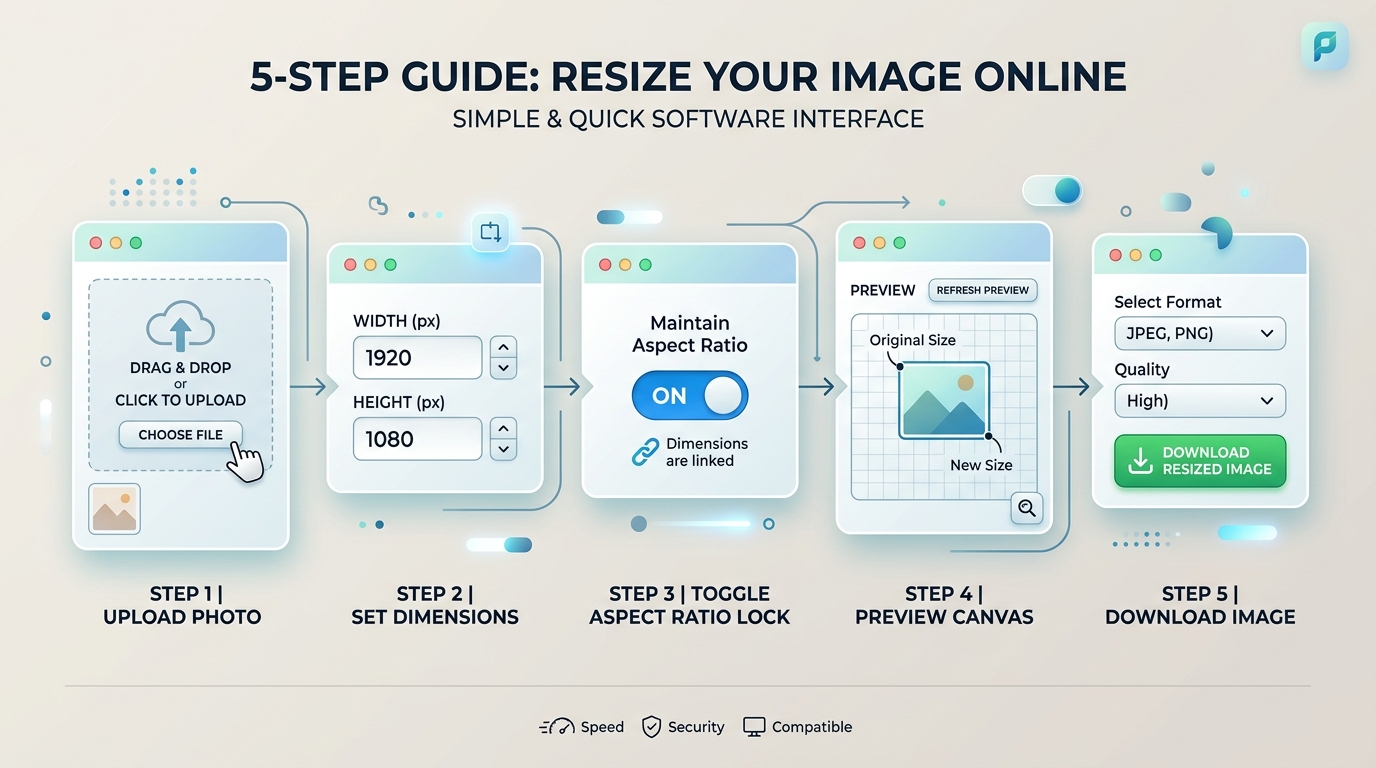
Below are five simple steps to resize any image online. Whether you're resizing a JPG, PNG, or WebP, this free online image resizer works the same way:
- Select or drag your image into the tool.
- Enter the target width and height in pixels, centimeters, or percentage, or choose a quick preset size (e.g., Passport, WhatsApp, Instagram, or UPSC).
- Toggle aspect ratio lock to preserve original proportions or unlock it to enter custom independent width and height values.
- Preview the result in the interactive canvas viewer.
- Download the resized image.
Why Resize Images Online with ResizeImages
Meeting exact dimension requirements
Many forms, portals, and templates specify an exact width and height, not just a file size limit.
Reducing file size
A smaller image (in pixels) generally produces a smaller file, which helps with upload limits and page load speed.
Fitting a layout
Website templates, print layouts, and presentation slides often expect specific dimensions to display correctly.
Standardizing a batch of images
Getting several images to the same dimensions for consistency.
Common Use Cases
Application & Portal Forms
Resize ID photos, signatures, and certificates to exact required dimensions.
Social Media & Banners
Standardize headers, avatars, and feeds for Instagram, YouTube, and WhatsApp.
E-Commerce Catalogs
Ensure product images share consistent square or rectangular aspect ratios.
What This Tool Does
Resizing changes the pixel dimensions of an image — making it wider, narrower, taller, or shorter than the original. This is different from cropping (which cuts away part of the image) and different from compressing (which reduces file size while keeping the same dimensions). This tool changes the actual width and height of the image itself.
Resizing is one of the most common image tasks: a form asks for an image of a specific width and height, a website template expects images at a set size, or a photo is simply larger than it needs to be for where it's going.
Resizing vs. Cropping vs. Compressing
| Operation | What it changes | Common use | Try it |
|---|---|---|---|
| Resize | Pixel dimensions (width × height) | Meeting an exact size requirement | Resize Image Tool |
| Crop | Removes part of the image | Changing framing or aspect ratio | Crop Image Tool |
| Compress | File size, not dimensions | Fitting under a KB upload limit | Compress Image Tool |
If you need a specific aspect ratio as well as specific dimensions (for example, a square photo), you may need to crop first, then resize. Preparing photos for competitive exams, job portals, or government IDs? Check our specialized Exam Tools with pre-calibrated passport dimensions and file limits.
A Note on Enlarging Images
Shrinking an image down generally looks clean, since detail is simply reduced. Enlarging an image beyond its original size doesn't add real detail back in — the tool has to generate new pixels to fill the extra space, which can make the result look soft or blurry compared to the original. For the sharpest result, start from an image that's already at least as large as the dimensions you need.
Are My Images Uploaded?
This tool resizes your image locally in your browser using standard HTML5 Canvas APIs. Your file isn't sent to a server, so no account, registration, or upload wait is required.